



10 Tips voor toegankelijke Mendix-apps volgens de European Accessibility Act
Reading time: ± 7 minutes
Context
Data exchange in healthcare is hard. Let alone when it involves patient data. Healthcare hasn’t solved this problem yet. Healthcare has added a collection of standards to it instead.
Epic, one of the largest EHRs in the US and with a growing presence in the Netherlands, addresses this with a generic API layer: the same accessible, standardized format for all its clients, based on HL7 FHIR (Fast Healthcare Interoperability Resources). Resources such as Patient, Observation, Condition and Encounter therefore have the same structure everywhere and a predictable URL pattern. In the Netherlands, the nl-core profiling of the zibs (Dutch care information building blocks) sits on top of that; the next blog in this series covers that specifically.
Healthcare organizations like to build an IT landscape around their EHR: patient portals, scheduling tools, reporting dashboards, custom care applications. That landscape only has value once those systems can actually reach the patient data. Mendix is a good platform for that, provided the connection to the EHR is in place. MxBlue built that connection for Epic: the Epic Connector.
The connector handles the authentication. The data itself then unlocks possibilities such as a dashboard that automatically pulls lab values from Epic overnight, or an integration that periodically synchronizes patient data, without a logged-in user involved anywhere. This blog covers how that authentication works, what the Epic Connector automates, and what scope the module covers.
How authentication with Epic works
You secure an ordinary REST API with an API key or a shared secret. You send credentials along, the server checks them, and you’re done. For server-to-server communication where multiple independent parties talk to the same service, that’s an unpleasant property. A shared secret is not a secret: once it leaks, there’s no way to find out who leaked it.
For backend integrations, Epic mandates SMART Backend Services, based on RFC 7523 (the OAuth 2.0 standard for client authentication using a signed JWT instead of a shared secret). The central principle is that your application proves its identity through a cryptographic signature instead of a password. That means there’s no shared secret that can be stolen or leaked. It costs more infrastructure than an API key, but it buys you something in return: every party is individually identifiable, and revoking a key only affects that one party.
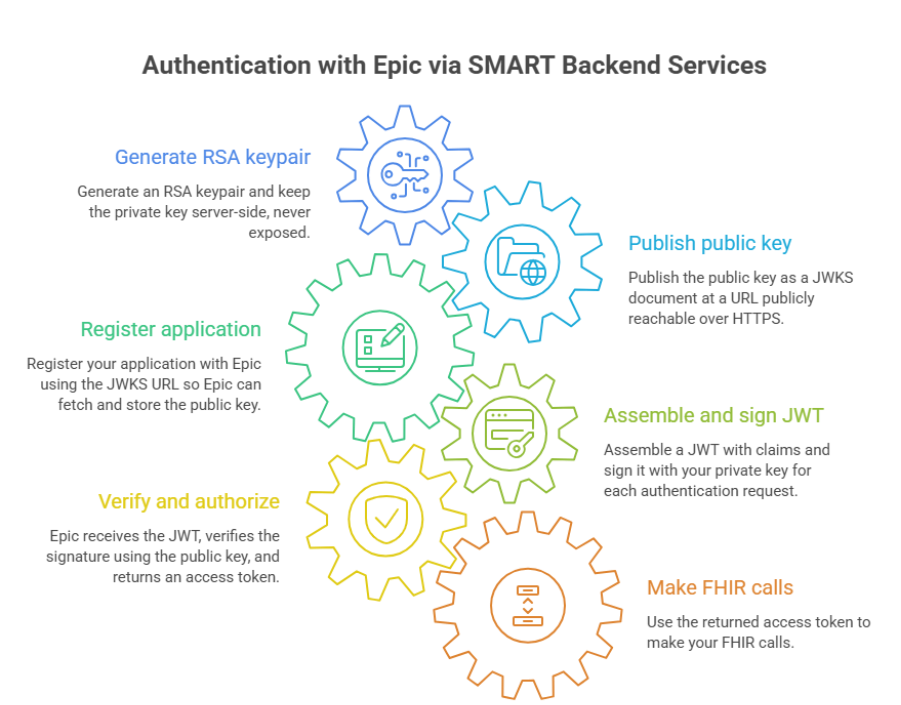
The mechanism works as follows. You generate an RSA keypair. You keep the private key server-side, never exposed. You publish the public key as a JWKS document at a URL that’s publicly reachable over HTTPS. You register your application with Epic using that URL; Epic fetches the public key and stores it.
For each authentication request, you assemble a JWT with claims describing who you are, when the token expires, and which endpoint it’s intended for. You sign the JWT with your private key. Epic receives the JWT, fetches the corresponding public key from your JWKS endpoint, verifies the signature, and returns an access token. You then use that token to make your FHIR calls.
What you need if you build this yourself:
- an RSA keypair, generated server-side
- a correctly formatted JWKS endpoint, publicly reachable over HTTPS
- logic to assemble and sign a valid JWT per call
- a key rotation strategy, because a private key that’s never replaced is a risk that keeps growing quietly
all of this per environment, since sandbox and production use separate app registrations and separate keys
This is manageable if you set it up properly once. It’s considerably less manageable if you rethink it for every project.
What the Epic Connector does
The Epic Connector is a Mendix Marketplace module that takes care of the infrastructure layer from the previous section: everything needed to gain access to Epic data. The FHIR data itself, and what you do with it, remains up to the developer.
Key management via the admin UI
From the included pages, you generate an RSA keypair. The private key is stored as an encrypted FileDocument via the JWT module and never leaves the application. The public key is automatically published on the JWKS endpoint, reachable by default at /rest/epic-connector/v1/jwks. You register that URL with Epic, and the connector takes care of the rest.
Configuration in database entities, not constants
Constants require a redeployment when switching environments. Database entities don’t. Per environment, you configure an EpicBackendConfig record with the client ID, token endpoint, and FHIR base URL; no new release needed to go from sandbox to production.
Retrieving a token via a single microflow
SUB_OAuthToken_Get_Epic handles the entire authentication process: assembling the JWT, signing it, submitting it to the token endpoint, retrieving the access token. The microflow either succeeds or throws an error. There is no in-between state. Do, or do not. There is no try.
FHIR-calls
FHIRResource_RetrieveByReference retrieves a single resource by type and ID. FHIRResource_Search performs a search call with a query string for any resource type of your choice. The result is a FHIRResource entity containing the FHIR JSON and metadata such as version and LastUpdated. Typed entities for Patient, Observation, Condition, and Encounter come via the FHIRMapper module, which exists alongside the connector and will be covered in a future blog.
Key rotation
Een nieuwe KeyMaterial activeren via de admin UI markeert de oude sleutel als inactief. Die sleutel blijft nog 24 uur zichtbaar in de JWKS: de tijd die Epic nodig heeft om zijn cache te verversen. Daarna verwijder je hem. De overgang is non-breaking.
Activating a new KeyMaterial via the admin UI marks the old key as inactive. That key remains visible in the JWKS for another 24 hours, the time Epic needs to refresh its cache. After that, you remove it. The transition is non-breaking. What remains after these five pieces is the application logic: what you do with the retrieved FHIR resources and how you translate them into typed entities via the FHIRMapper. That’s the subject of the next blog.
Security as a design decision
In a module that works with patient data, it’s worth making explicit which security choices were made, and why.
- Private keys never leave the application: generated via the JWT module, stored as an encrypted FileDocument, exposed by no endpoint, log, or interface.
- The JWKS endpoint publishes only the public half of active keypairs.
- Token logging is off by default: access tokens are never written to the Mendix log. Convenient for debugging, less convenient in a data breach.
- KeyMaterial and EpicBackendConfig sit behind Administrator-level roles and aren’t intended for regular users.
All four follow from the module’s design. They’re the default, and they require no extra configuration.
Scope
The connector targets backend-to-backend communication with Epic: a Mendix application talking to Epic without a logged-in user in the loop. Think automated data imports, clinical dashboards, or integrations that enrich Epic data with your own application logic.
Out of scope:
- user-context flows, where an individual user logs in via Epic and the application acts on their behalf
- other EHR systems
- consent management
- access control within your own application
The connector focuses on the access layer to Epic. What happens with the data after that is up to the developer. From here on, it’s your problem, in the best possible sense of the word.
Conclusion
The Epic Connector handles authentication for backend access to Epic: RSA keypairs, a JWKS endpoint, JWTs you sign per call under SMART Backend Services. That’s infrastructure you’d otherwise have to build, test, and maintain yourself, separately for every environment. And it happens with security as the starting point, not as a checklist you tick off afterward.
What you do with the retrieved data is up to you. Translation into typed entities such as Patient and Observation happens via the FHIRMapper module, the subject of the next blog.
Healthcare organizations looking to build an IT landscape around their EHR now have a way to do that from Mendix, without having to design an authentication mechanism themselves.
Auteur: Stephan Wolbers – Head of Technology & Innovation MxBlue|SUPERP